WordPress content operations
From content brief to published WordPress post.
WPContent Flow brings AI-assisted writing, SEO, batch queues, recipe data, image prompts, and publishing into one reviewable workflow—inside WordPress.
- Bring your own AI provider
- Review before publishing
- Built for native WordPress workflows
Workflow progress
- 01ArticleComplete
- 02SEOReviewing
- 03Image promptsQueued
- 04FinalizeWaiting
You stay in control.
Review the generated content, metadata, and publishing settings before it goes live.
Works where your content lives.
The working set
One content system.
Fewer loose ends.
Move from a single brief or a batch file to a structured WordPress draft without stitching together a maze of disconnected tools.
Staged generation
Build article content, SEO data, optional recipe data, image prompts, and final output in clear, saved stages.
Provider flexibility
Set provider priority, choose an available model, and use retryable failover across supported AI services.
Batch-ready operations
Import TXT or CSV inputs, preview the queue, run work in the background, and retry, resume, or cancel jobs.
WordPress publishing
Resolve authors and categories, choose featured media, and save as draft, publish now, or schedule for later.
A deliberate workflow
Brief in. WordPress-ready content out.
Each step is visible, reviewable, and built to recover when real production work gets messy.
- 01
Set the direction
Add a topic, language, category, and any extra instructions—or import structured TXT input.
- 02
Generate in stages
Move through article, SEO, optional recipe, image-prompt, and finalization stages with progress saved.
- 03
Review and refine
Search, filter, sort, inspect, and regenerate content before it reaches your editorial calendar.
- 04
Publish your way
Create a draft, publish immediately, or schedule the post with WordPress-native settings.
Product interface
See every stage—not a black box.
WPContent Flow keeps operational detail visible: stages, queue state, article status, publishing choices, and recoverable actions.
- Persistent generation progress
- Cancellation and recovery controls
- Search, filtering, sorting, and review
- Publishing history and safe failure reporting
Choose your engine
Six built-in AI providers.
Plus custom connections.
Choose from six built-in AI providers, or connect an OpenAI-compatible custom endpoint on eligible plans.
- OOpenAI
- GGoogle Gemini
- AAnthropic Claude
- GGroq
- MMistral
- DDeepSeek
Provider note: Perplexity is currently unavailable while its integration is being migrated.
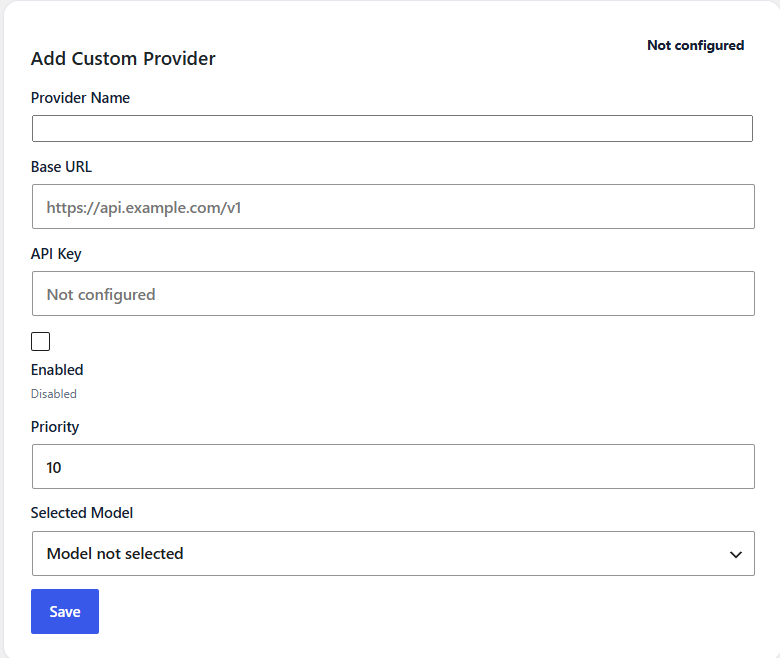
Custom Providers
Your endpoint. Your model. Your content workflow.
On eligible plans, connect an OpenAI-compatible AI endpoint using its base URL and API key, then manually select an available model.
-
01
Name your provider.
Enter a recognizable Provider Name.
-
02
Add connection details.
Enter the provider’s Base URL and API Key.
-
03
Set availability and priority.
Enable the provider and set its Priority.
-
04
Choose a model and save.
Manually select an available model and save the configuration.
Requires an OpenAI-compatible endpoint. Availability depends on your plan.
Your API key is entered securely inside the WPContent Flow plugin—never on this website.
SEO workflow
Metadata that travels with the article.
Generate and review SEO titles, descriptions, focus keywords, slugs, excerpts, categories, and tags.
example.com / content-workflow
Recipe content
Optional recipe data, ready for WP Tasty.
Generate structured recipe information and publish it through the current WP Tasty Recipes integration when that workflow is enabled.
Roadmap Native WPContent Flow Recipe Cards are not released yet.
Structured fields • editable before publishing
Batch + publishing
A queue you can actually operate.
Turn TXT or CSV inputs into background jobs powered by WordPress Cron. Preview the queue, follow progress, recover failed work, and control when completed posts are published.
Why WPContent Flow
Automation with checkpoints.
The goal is not to remove editorial judgment. It is to remove repetitive handoffs while keeping the important decisions visible.
WordPress-native
Content, authors, categories, media, metadata, and publishing all resolve where your team already works.
Recoverable
Saved progress, retries, resume actions, cancellation, and safe failure reporting support real production conditions.
Provider-independent
Choose among supported AI providers instead of rebuilding your workflow around a single vendor.
Editor-controlled
Review the article and its publishing data before choosing draft, immediate, or scheduled delivery.
Licensing + updates
Protected updates, delivered through WordPress.
Eligible licensed installations can discover and install verified releases through the native WordPress update flow. Packages are protected and checked for integrity before installation.
- Manual one-click updates
- License re-check before download
- Package size + SHA-256 verification
- Settings preserved across verified updates
Unattended automatic updates are not currently presented as a supported production feature.
FAQ
Straight answers.
No power-ups required.
Everything here reflects the current v1.5.2 product—not the roadmap.
Does WPContent Flow generate images?
No. The current product generates prompts for featured, in-article, ingredient, and Pinterest-oriented images. It also supports featured-image selection, but it does not claim built-in AI image generation.
Which AI providers are available?
OpenAI, Google Gemini, Anthropic Claude, Groq, Mistral, and DeepSeek are the current built-in providers. Perplexity is temporarily unavailable during migration.
Can it publish recipe content?
Yes, through the optional current WP Tasty Recipes data-generation and publishing integration. Native WPContent Flow Recipe Cards remain a roadmap item.
Can I process content in batches?
Yes. Current batch workflows accept TXT and CSV input, use WordPress Cron for background processing, and include queue preview, progress, retry, resume, and cancellation controls.
Are plugin updates automatic?
Manual one-click native WordPress updates are verified for eligible licensed installations. Unattended automatic updates are not currently promised.
Ready when you are
Build a content flow your team can see, steer, and scale.
Explore the current workflow, provider support, and publishing controls—without the black-box promises.